UI/UX DesignDesign that makes complex products feel effortless.

We research, design and prototype web and mobile products, then hand engineers screens they can build without guessing. Designers and developers on one team, from first sketch to shipped release.

BTN
H1
CTA
CARD
CARD
CARD
  • Web & mobileiOS, Android and responsive web
  • Design + codeDesigners and engineers on one team
  • Dev-readyFigma files with tokens, variants and specs
Designed for
  • AutoDice
  • eNalozi
  • High-fashion retailer
Why design matters

Signs your product needs design, not more features

Most products don't fail because something is missing. They fail because people can't find, understand or trust what is already there.

  • Warning sign 01

    Users leave before the “aha” moment

    Sign-up works, but onboarding is long or unclear, and people never reach the part of the product that delivers value.

  • Warning sign 02

    Features exist, but nobody finds them

    Support keeps answering “can it do this?” for things the product already does. Navigation and hierarchy are hiding them.

  • Warning sign 03

    Every screen looks like a different team made it

    Buttons, spacing and patterns change from page to page. The product feels unfinished and every new screen takes longer.

  • Warning sign 04

    Developers fill design gaps with guesses

    States, edge cases and mobile layouts are missing from the files, so engineers improvise and QA finds the gaps late.

What we do

UI/UX design services, from research to release

Bring us in for a single step or the whole journey. Every deliverable is made to be tested with users and built by engineers.

  • UX research & discovery

    Stakeholder workshops, user interviews and competitor reviews that turn assumptions into clear product priorities.

  • Information architecture & user flows

    Structure, navigation and end-to-end journeys mapped before a single pixel is polished.

  • Wireframes & interactive prototypes

    Clickable prototypes that let you test ideas with users and investors before anything is built.

  • UI & visual design

    Interfaces with a clear hierarchy and a visual language that fits your brand, from dashboards to consumer apps.

  • Design systems & component libraries

    Tokens, components and usage rules in Figma that map one-to-one to the components in your code.

  • Mobile app design

    iOS and Android experiences that respect platform conventions, thumbs, offline states and small screens.

  • Usability testing

    Moderated and unmoderated sessions with real users, summed up as concrete fixes, not just observations.

  • UX audit & redesign

    A structured review of your live product, and a redesign plan you can roll out step by step.

Selected work

Designs that made it to production

Three products we designed and built end to end, each with a different audience and very different constraints.

AutoDiceStartup · Automotive marketplace

A car marketplace where buyers set the terms

The buyer describes the car they want and sellers compete with offers. Both sides needed their own journey, with bidding, chat and viewing schedules that feel simple instead of overwhelming.

Key design decisions

  1. The buyer describes, sellers offer.Instead of browsing listings, the buyer describes the car, budget and key criteria, and relevant sellers respond with offers.
  2. Position, not prices.Sellers see only where their offer ranks, which keeps the bidding fair and the UI calm.
  3. Agents arrange the viewing.With calendars connected, the buyer’s and seller’s AI agents find a shared slot and book the viewing themselves.
Platform
Web app, responsive on all devices
What we delivered
Discovery, UX/UI for buyers and sellers, design system, full-stack development
  • Figma
  • Next.js
  • Node.js
  • OpenAI
Read the case study
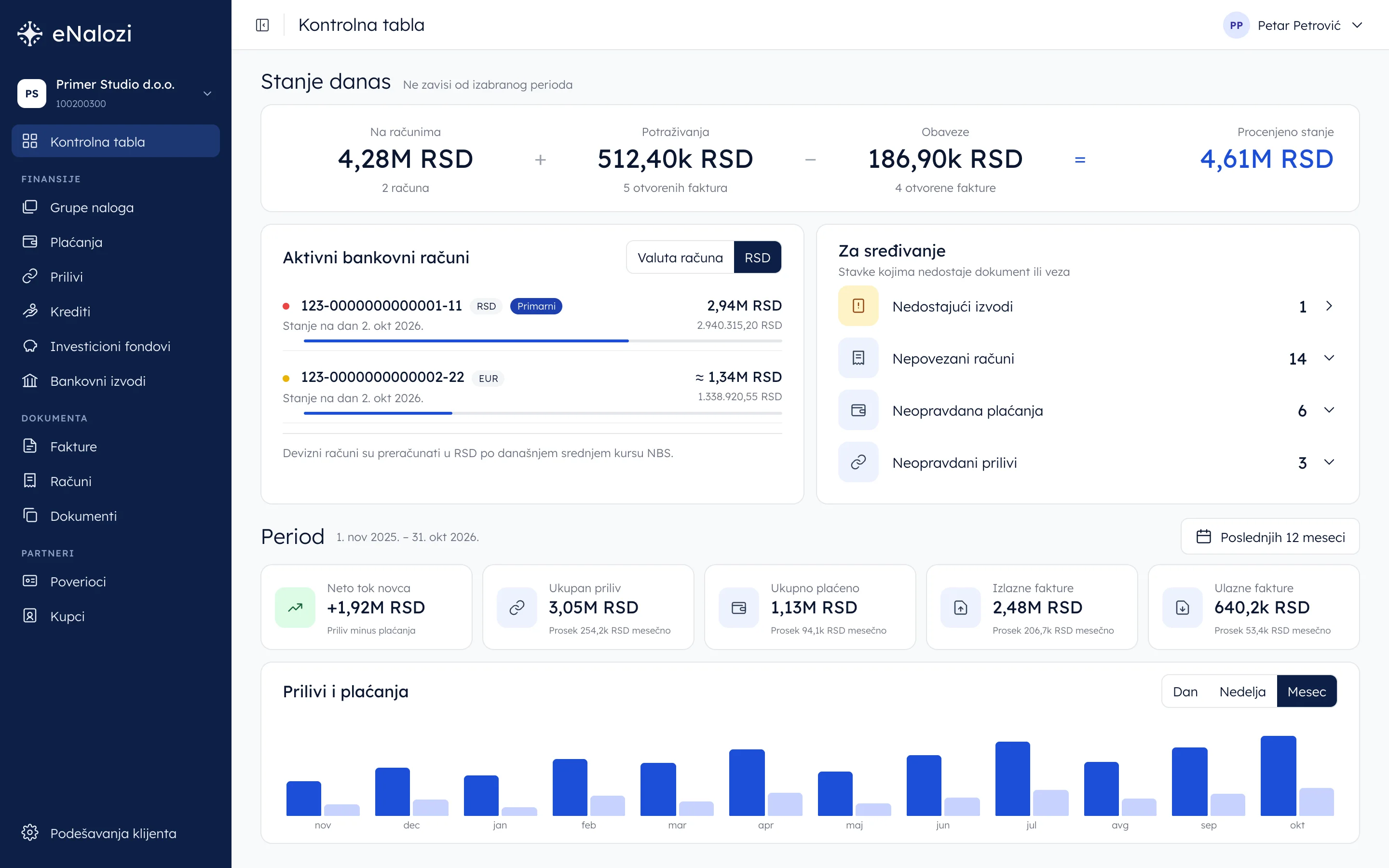
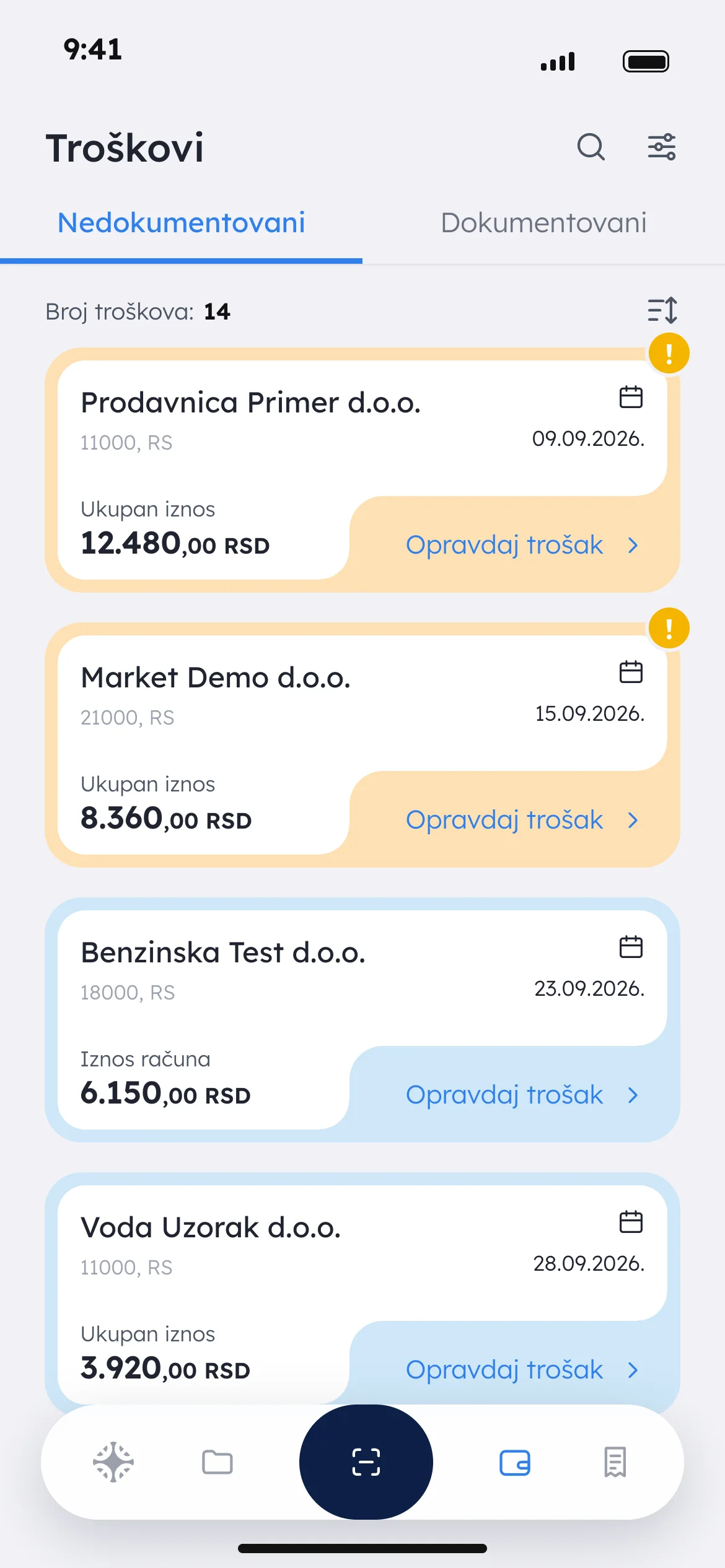
eNaloziFintech · Business finance

Company finances, readable at a glance

Founders and finance teams needed to understand cash flow, unpaid invoices and pending expenses on a phone, without a spreadsheet and without an accountant on the call.

Key design decisions

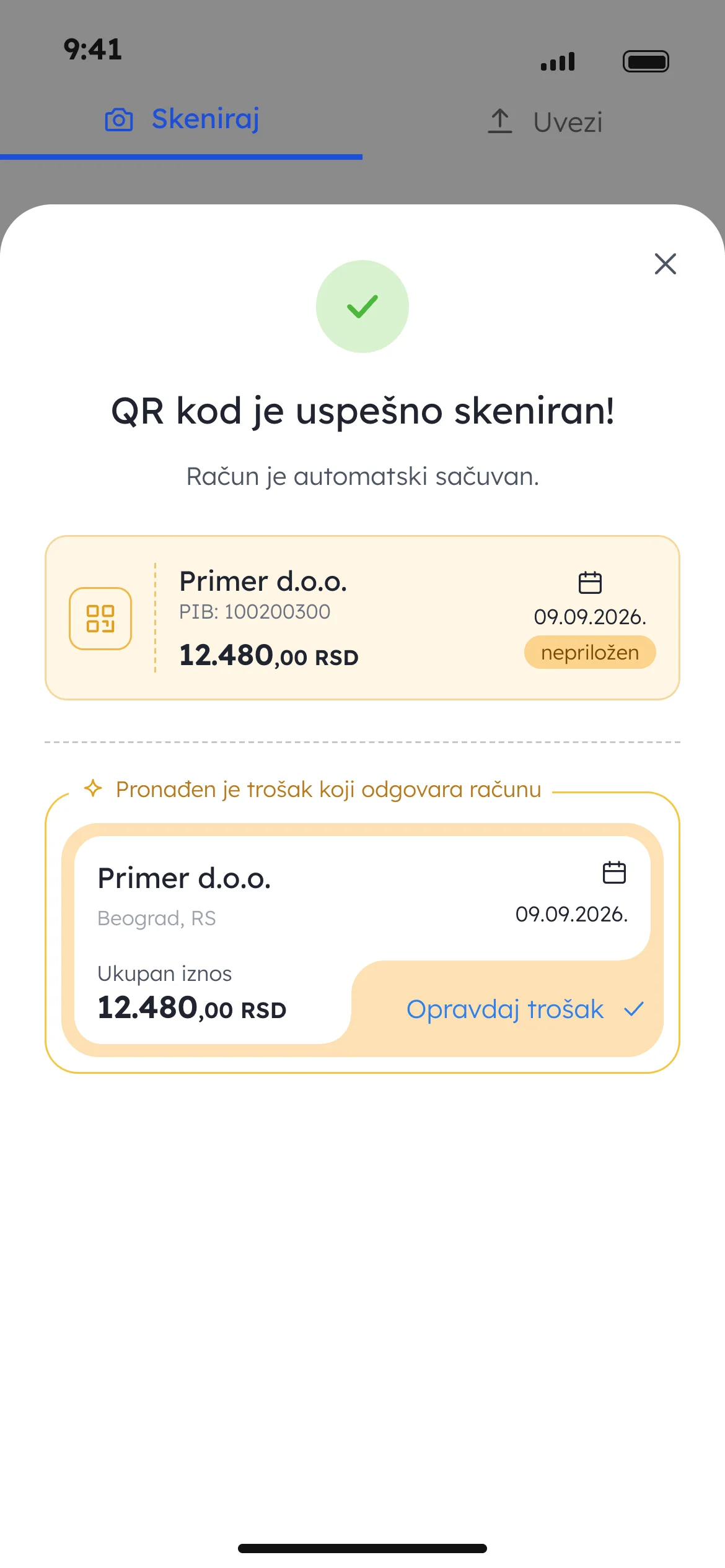
  1. Scan first.Fiscal receipts are captured with a QR scan and verified automatically, with no forms to fill in.
  2. AI does the matching.Receipts snap to bank transactions; only uncertain pairs ask a person to confirm.
  3. Two roles, one product.A simple phone app for businesses and a multi-firm workspace for accountants.
  4. Clear statuses everywhere.Invoices and expenses move through visible states, with approvals that take one tap.
Platform
Web app, iOS and Android
What we delivered
Product strategy, UX research, information architecture, UI, design system, development
  • Figma
  • Next.js
  • React Native
  • Node.js
  • OpenAI
Read the case study
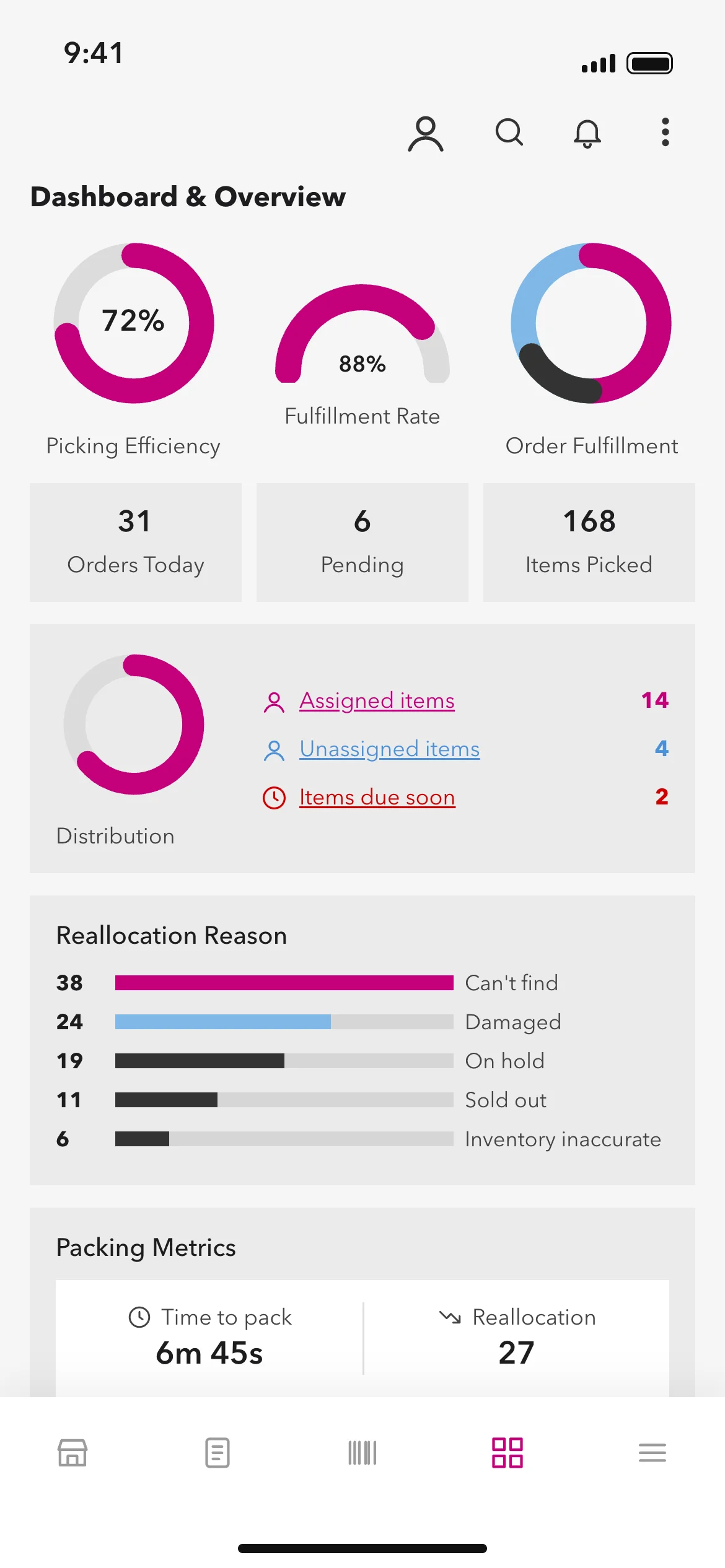
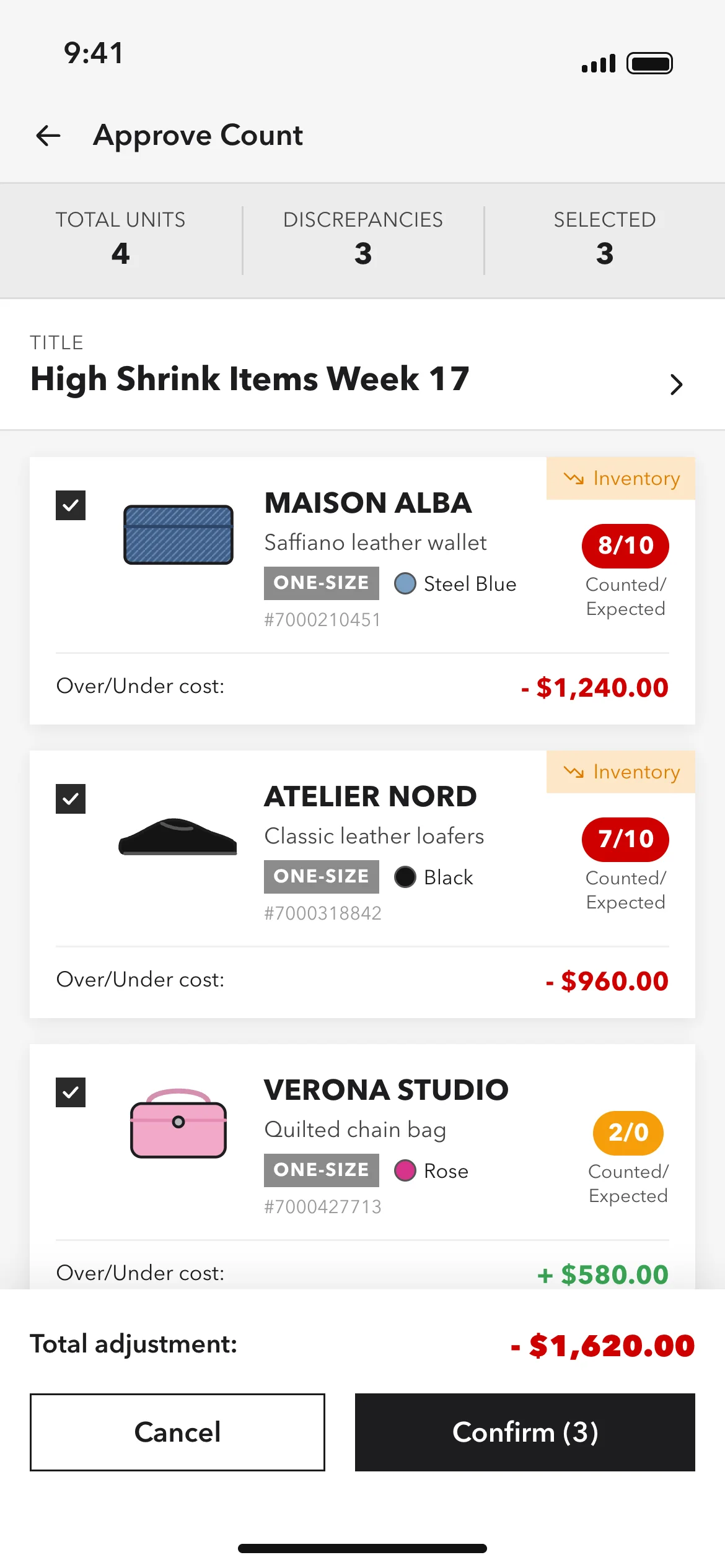
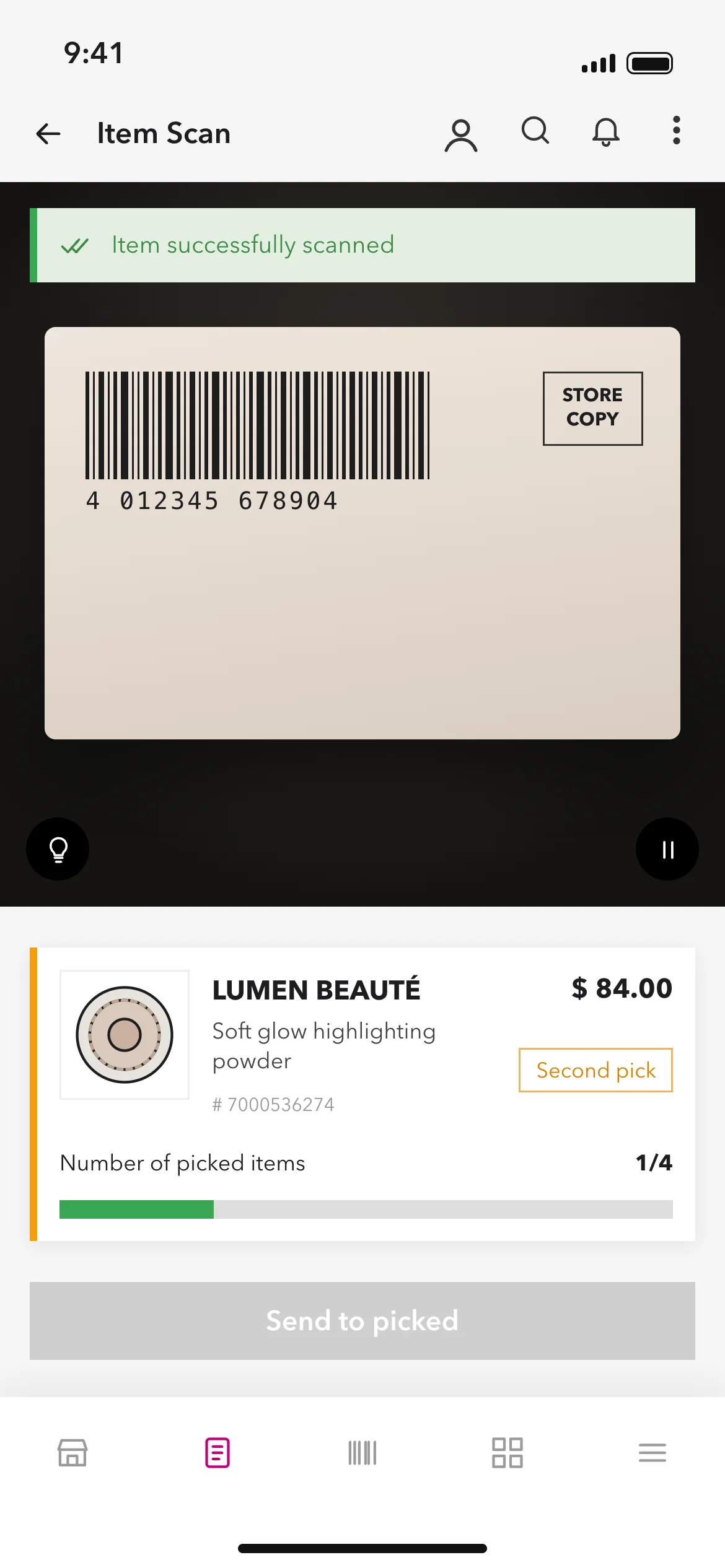
High-fashion retailerRetail · Inventory management

Inventory for a high-fashion store, designed for the shop floor

High-value pieces, many sizes and colourways, and stock split between the shop and the warehouse. Staff needed to find, move and count items in seconds, while serving clients, on a phone.

Key design decisions

  1. Scan first.Adding, moving and counting items starts from a barcode or QR scan, not a form.
  2. Photo-first item cards.Staff recognise pieces by sight, not by SKU, so the image leads every list and detail screen.
  3. One tap to act.Stock movements between shop and warehouse, and low-stock alerts, are always one tap away.
  4. A quiet, editorial UI.Neutral tones and generous spacing that feel like the brand, not like a warehouse tool.
Platform
iOS and Android app
What we delivered
Research, UX flows, UI, design system, development and launch
  • Figma
  • React Native
  • Node.js
Design × engineering

Designed by the people who build it

Our designers sit in the same team as our engineers. Every design is checked for feasibility while it is drawn, so what you approve in Figma is what ships.

Tools we design with
  • Figma
  • FigJam
  • Figma prototyping
  • Maze
  • Storybook
  • Lottie
Need it built too? See MVP development
  • Dev-ready Figma files

    Auto layout, variants, every state and edge case, plus specs engineers don't need to ask about.

  • Components mapped to code

    Design tokens and components share names and structure with the codebase, so the system stays in sync.

  • Engineers in design reviews

    Tech leads review flows early, so performance, data and platform limits shape the design, not delay it.

  • Accessible by default

    Contrast, touch targets, focus states and screen reader labels are designed in, aligned with WCAG 2.2 AA.

What our clients say

AutoDice

Ncoded Solutions completed everything we asked for, and more. They delivered on time and on budget, and I never felt that anything was falling through the cracks. Their communication is incredible, their attitude is excellent, and they always go the extra mile to solve issues. They're a great group of engineers and a great group of human beings.

How we work

A design process you can follow week by week

Short cycles, visible progress and a clear deliverable at the end of every step.

  1. 01

    Discover

    Workshops, user interviews and a review of your product, data and competitors.

    You get Research summary and priorities
  2. 02

    Define

    We map users, goals and journeys and agree on what the first release must solve.

    You get User flows and information architecture
  3. 03

    Wireframe

    Low-fidelity screens to settle structure and content before visual design.

    You get Wireframes of key journeys
  4. 04

    Design

    High-fidelity UI with a component library and design tokens.

    You get UI designs and design system
  5. 05

    Prototype & test

    Clickable prototypes tested with real users, then refined.

    You get Tested prototype and findings
  6. 06

    Handoff & support

    Specs, assets and design QA of the build, so the shipped product matches the design.

    You get Dev-ready files and implementation review
Ways to work together

Start small or design the whole product

Pick the model that fits where your product is today. You can always move from one to the next.

02
Product design

Design a new product or redesign an existing one

End-to-end design from research to a tested prototype and a design system.

4–12 weeks, depending on scopeTested designs your engineers can start building
03
Ongoing design partner

A designer embedded in your team

Continuous design for new features, experiments and design system upkeep, in your sprints.

Monthly, flexible capacityDesign that keeps pace with development
Let's talk design

Have a product that should feel simpler?

Show us your product or your idea. In one call we'll point out what's working, what's getting in the way and how we would approach it.

FAQ

UI/UX design questions, answered

What does your UI/UX design process include?

Discovery and user research, information architecture and user flows, wireframes, high-fidelity UI, a design system, interactive prototypes, usability testing and handoff to development. You can hire us for the full process or a single step, such as a UX audit or a design system.

How long does UI/UX design take?

A UX audit takes 1–2 weeks. Designing an MVP usually takes 4–8 weeks, and a larger product or redesign 8–12 weeks or more. We work in short cycles, so you see and review progress every week.

What do I get at the end?

Organised Figma files with every screen and state, a component library with design tokens, a clickable prototype, research and testing findings, and specs for developers. Everything is yours, with full ownership.

Can you also develop the product you design?

Yes. Ncoded is a design and engineering company, so the same team can take your product from design to launch on web and mobile. If you have your own developers, we hand off dev-ready files and support them during implementation.

Can you redesign an existing product without starting over?

Yes. We start with a UX audit, fix the issues with the biggest impact first and roll out a redesign step by step, so your users and your roadmap aren't disrupted.

Do you do user research and usability testing?

Yes. We run user interviews, surveys and moderated or unmoderated usability tests, and turn the results into concrete design changes. If you can't reach users yet, we start with proto-personas and test as soon as there is a prototype.

How do you handle accessibility?

Accessibility is part of the design system, not an afterthought. We design for WCAG 2.2 AA: sufficient contrast, readable type sizes, touch targets, focus states, error messaging and labels for screen readers.

How much does UI/UX design cost?

It depends on scope: the number of user journeys, platforms and how much research is needed. After a free design review we send a clear proposal with scope, timeline and price, either as a fixed project or as monthly design capacity.